

What's New?
Web: September | 2026
Updated at 9/15/2026
Hello,
Stay up to date with the latest features and enhancements we’ve just launched on the Dynamox Platform.
Check out what’s new and leverage these updates to their fullest!
Platform
1 – Asset Pro Conveyor Belt: 5-Roller Idler Frame Support
To accurately represent larger conveyors, Asset Pro Conveyor Belt now natively supports 3- and 5-roller idler frames.
What Changed?
Configuring a 5-roller idler frame unlocks four new monitoring positions on the platform, accounting for two monitoring points per roller.
Configuration Flexibility
Configuration is handled individually for each idler frame, enabling 3- and 5-roller frames to coexist on the same conveyor belt.
Guaranteed Compatibility
Existing idler frames remain unchanged. Monitoring points, measurement history, and operational data are fully preserved.
Value Delivered
The new configuration expands monitoring coverage for large-scale conveyors, streamlining point tracking directly within the platform.
Enhanced visibility into roller conditions empowers teams to detect problems with pinpoint accuracy, mitigate operational risks, and optimize maintenance planning—all without altering previously configured structures.
2 – Linking Alerts to Reports
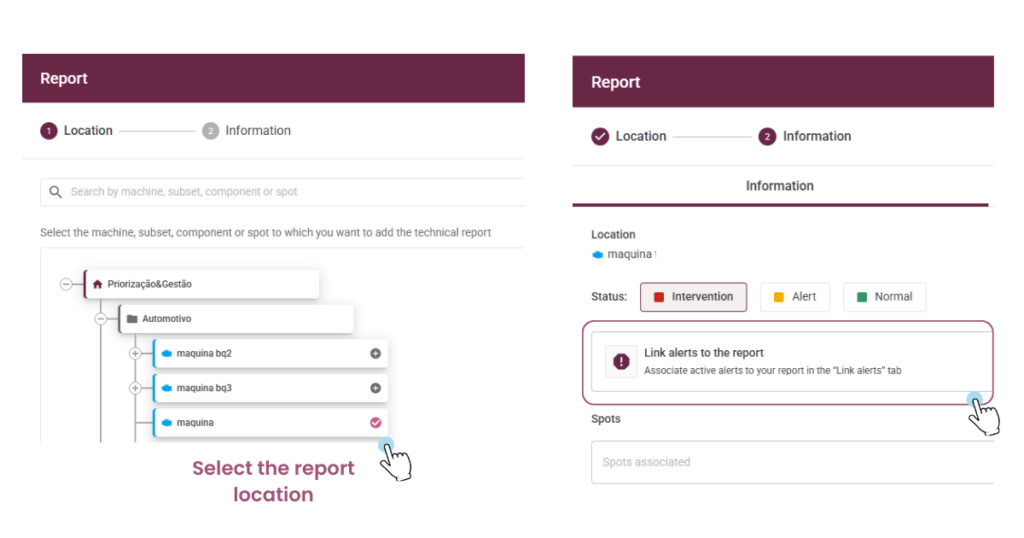
Creating or editing a report now includes a new step called Associate Alerts, seamlessly integrated right after location definition.
Users can select the A1 and A2 alert events that triggered the report across any hierarchy level: machine, assembly, or spot.
The Practical Impact
- It establishes a formal traceability trail connecting anomaly detection directly to the action logged in the report.
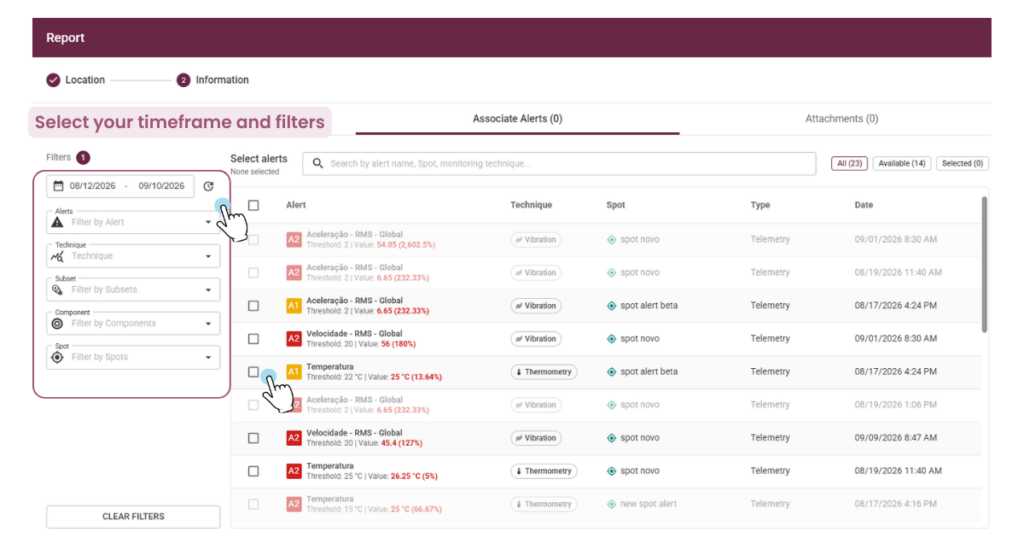
- Each event displays comprehensive data: policy, date and time, level, threshold, measured value, spot, and monitoring technique.
- The monitoring technique triggering the alert, such as Vibration or Thermometry, auto-populates based on the selected alerts.
- The list filters by date, level, technique, subassembly, component, and spot, driving a more efficient analysis.
- Alerts already linked to another report for the same asset are flagged and rendered unavailable for duplicate selection.
- During editing, users can view, add, or unlink alerts without deleting the original event.
Important: Association is optional, and alerts generated prior to this update are unavailable for retroactive linking.
3 – Revamped Reports
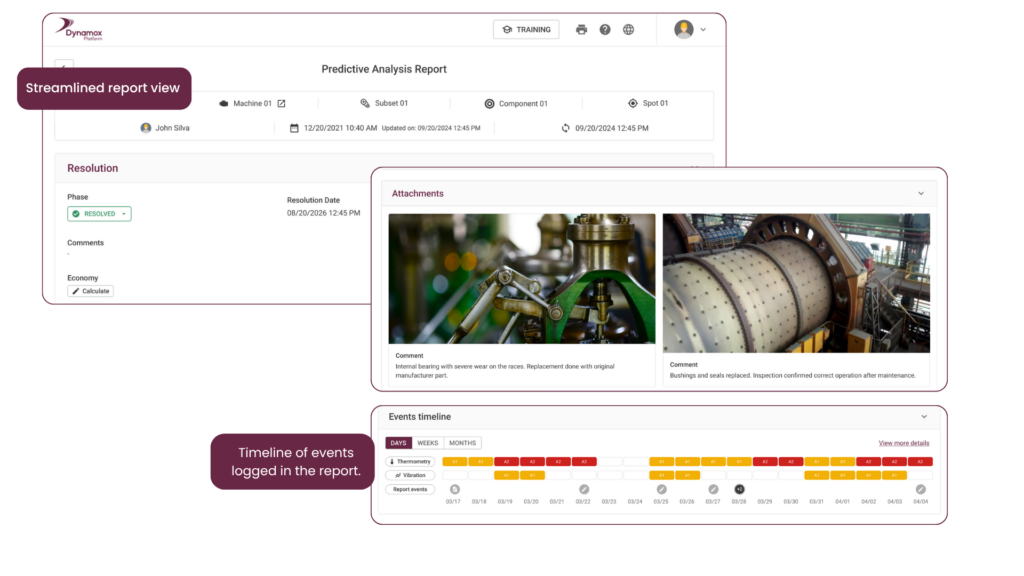
Predictive and sensitive analysis reports now feature a more compact, responsive layout, consolidating the entire context into a single document.
All previously logged data remains fully intact.
The Practical Impact
- Attachments no longer consume an entire page each, significantly optimizing the generated PDF file size.
- A newly added History section automatically logs all relevant actions performed within the report.
- Linked alerts now populate their own dedicated section, providing clear documentation of the events that prompted the report.
- In the Reports Dashboard, a new monitoring technique column and corresponding filter empower users to quickly locate reports by Vibration or Thermometry.
4 – Background Mass Asset Configuration
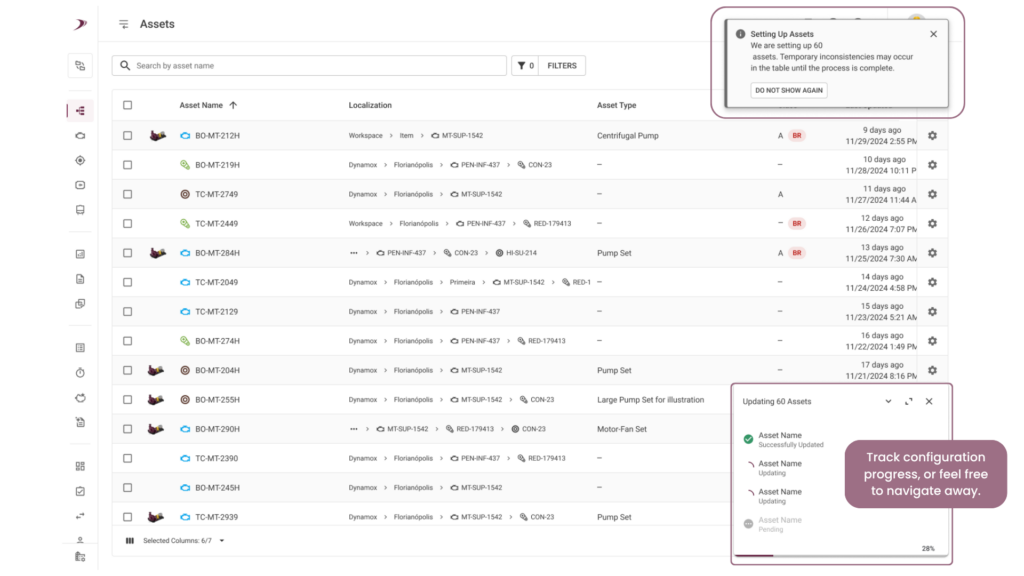
Previously, users were required to stay on the screen until processing concluded, a cumbersome step for large batches.
The operation now runs entirely in the background.
The Practical Impact
- Users initiate the action and continue navigating the platform, or even close the window, without halting the ongoing processing.
- The platform displays execution progress and triggers a notification upon batch completion.
- Potential failures receive transparent handling, ensuring greater predictability during tracking.
The result: scaled operational autonomy and maximized productivity for high-volume configurations.
5 – External System Alarms Visible Inside the Dynamox Platform
Numerous operations manage alarmed points in legacy or complementary systems, capturing relevant conditions that typically remain outside the platform’s alert workflow.
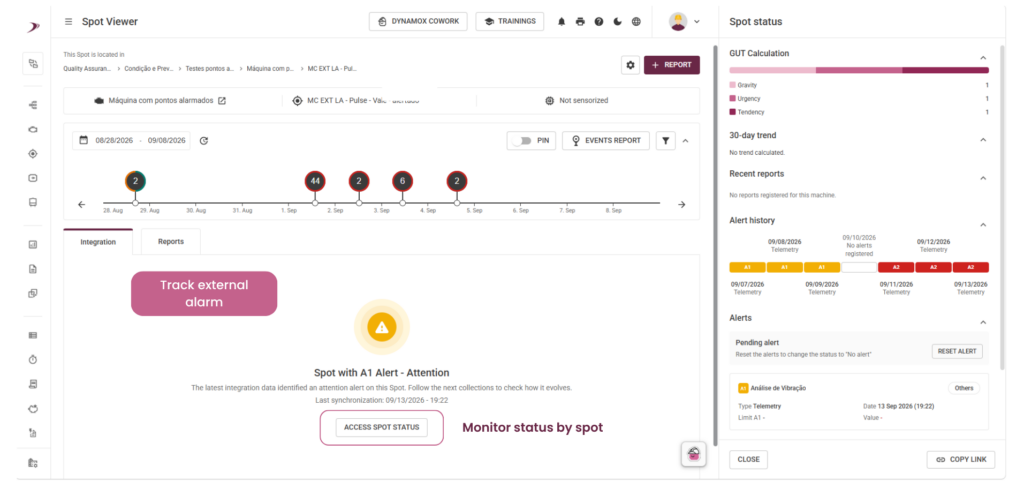
The new integration leverages external sources to report the alarm status of monitored points directly to Dynamox.
The Practical Impact
- Users track external alarms seamlessly, eliminating the need to switch between tools.
- The platform indicates data sourced from an integration, providing full traceability regarding when and by whom it was updated.
- The point displays its received status, such as attention or critical, enhancing the overall assessment of asset health.
- Whenever necessary, the reading’s alert status can be redefined directly on the point or within the DMA via the spot situation option.
Important: Resolving an alert does not automatically shift the A1/A2 status to A0. The action generates a new, updated reading but leaves the prior event status unchanged. This must be considered when interpreting point history.
6 – Your Logo on Dynamox Cowork Reports
Documents generated by the platform frequently circulate independently or as attachments to client corporate materials. They can now feature your organization’s logo, initially available for Dynamox Cowork reports.
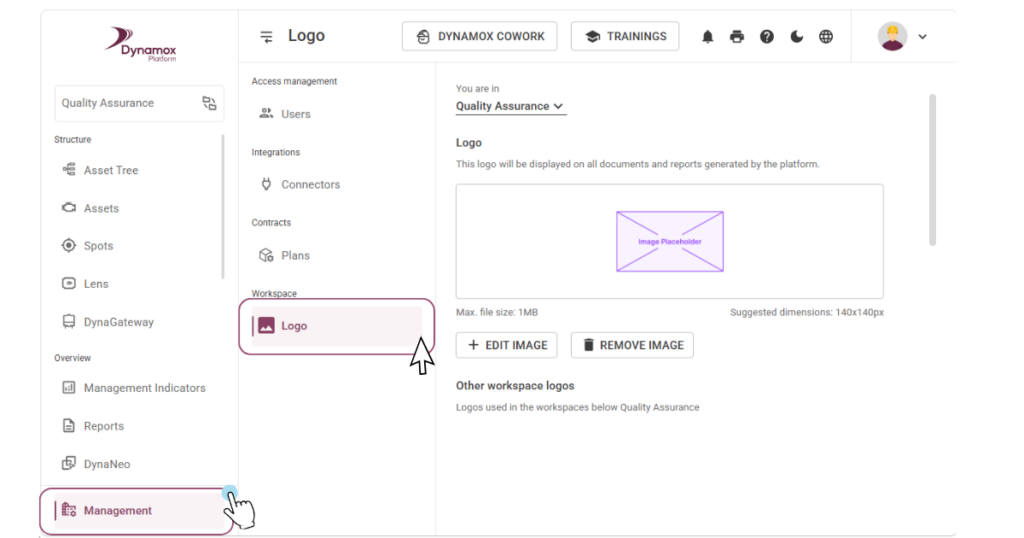
To configure it, navigate to the Administration menu and select the Logo option in the auxiliary menu.
The Practical Impact
- Users select the target folder for the logo and upload a PNG, JPG, or JPEG image (up to 5 MB).
- The same interface displays logos configured in subfolders beneath the selected one, streamlining management across multi-plant operations.
- Child folders automatically inherit the parent folder’s logo, though specific configurations consistently take precedence: a child folder with its own designated logo overrides the inherited one.
Important: This configuration is restricted exclusively to users with Workspace Administrator profiles.
The interface does not support cropping, zooming, or rotating the image. The file must be prepared in an image editor prior to uploading.
These improvements were designed to make your monitoring more intuitive and efficient, contributing to a more agile and clear operation in your daily routine.
Do you have any questions or want to know more details about any of these updates?
Talk to our team!
Back to articles


