


What's New?
Web: March | 2026
Updated at 3/17/2026
Hello,
Stay up to date with the latest features and enhancements we’ve just launched on the Dynamox Platform.
Check out what’s new and leverage these updates to their fullest!
____________
New: Machine movement in the asset ree
It is now much easier to reorganize your asset structure in the Dynamox Platform. With the new feature, you can move machines between folders in the Asset Tree quickly and easily, just as you already do with Spots. Simply drag the machine to the desired folder and you’re done: the platform automatically records the movement, updating your monitored plant structure in real time. There’s no need to fill out forms or contact support, you now have full autonomy to organize your assets according to the needs of your operation.
Step-by-Step:
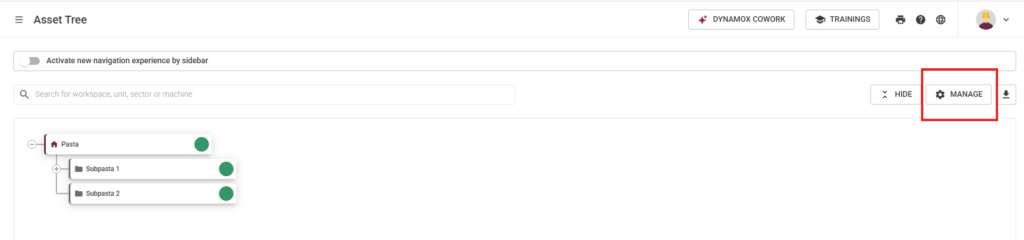
1. Once inside the platform, access your asset tree and click on “Manage“.
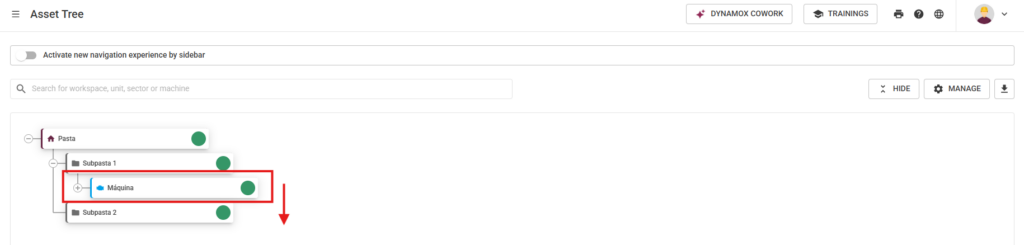
2. Select the machine you want to move.
3. Click and drag the machine to the desired folder.
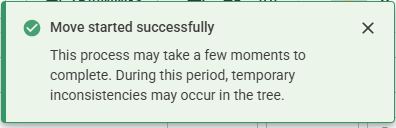
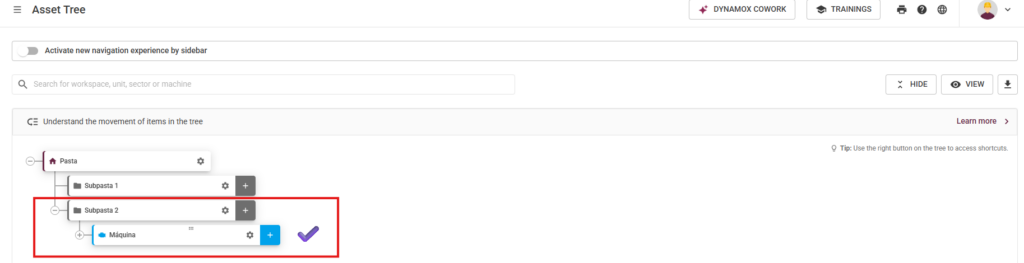
4. The movement may take a few seconds depending on the asset’s complexity. You will receive a notification that the movement has started, and once complete, your machine will have been successfully moved.
This improvement is designed to make your routine more agile, reduce time spent on administrative task, and boost your operational efficiency. Additionally, by making it easier to reorganize assets, you gain more flexibility and control over your plant management.
Key benefits for you:
- More autonomy to organize machines and folders
- Reduced time and effort to keep the Asset Tree up to date
- Less dependence on Dynamox support for movements
- A more intuitive and efficient platform
Try it now and see how managing your assets can be even more practical with Dynamox!
____________________________
New: Microsoft SSO login available for all plans
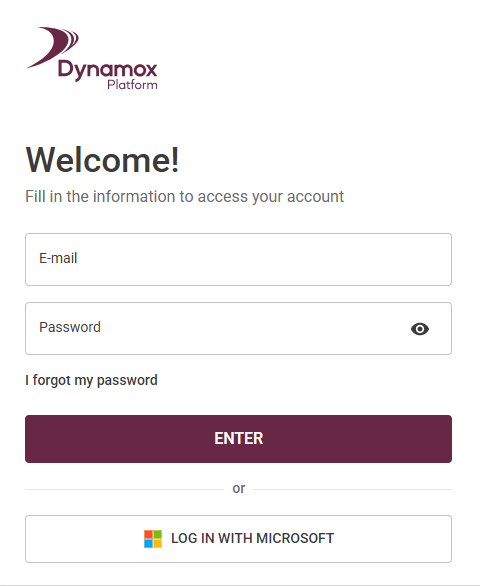
To make access even easier while reinforcing information security, Dynamox now offers Microsoft Single Sign-On (SSO) login for all users — including those on the standard plan.
With this update, you can access the Dynamox Platform using your corporate Microsoft account, without needing to create or remember another password. Simply click “Sign in with Microsoft” and, if you’re already authenticated in Microsoft, access is immediate.
Key benefits for you:
- More convenience: fast access, with no need for a dedicated Dynamox password.
- More security: reduces the risk of password leaks and centralizes access control in your company’s IT team.
- Less hassle: no more worrying about recovering or managing multiple passwords.
Traditional password login remains available, ensuring flexibility for all users.
This enhancement reinforces Dynamox’s commitment to security and customer experience, making platform access simpler and more protected.
____________________________________
New: Analysis plan execution reports
Tracking progress and operational discipline across your analysis plans is now much easier on the Dynamox Platform. With the new Reports feature, you gain access to a true logbook of each plan cycle, offering greater traceability and transparency in your monitoring process.
Step-by-Step:
1. A new “Reports” button is available directly on each analysis plan card.
2. Inside, you can view the full history of plan executions, including details such as: responsible user, frequency, creation date, total assets, and monitored spots.
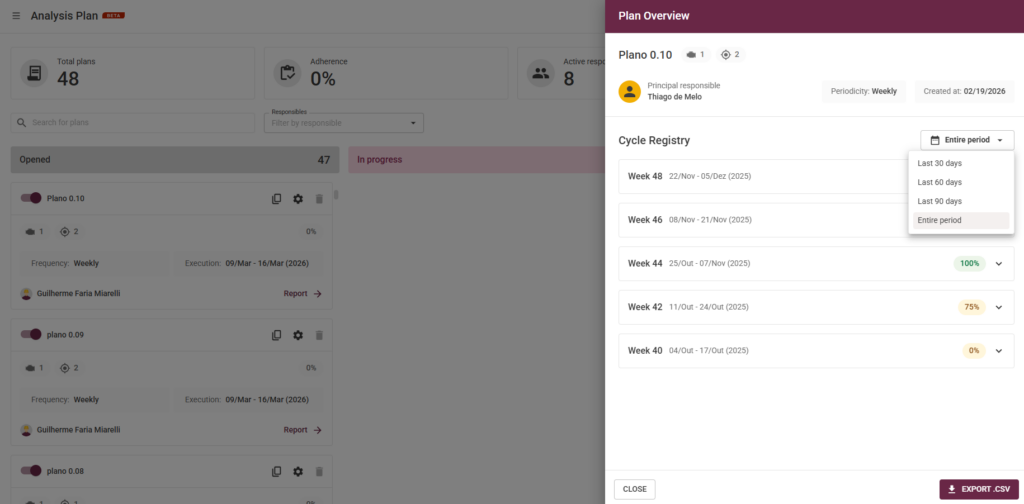
3. Execution cycles are displayed in a list format with a period filter (last 30, 60, 90 days, or full history).
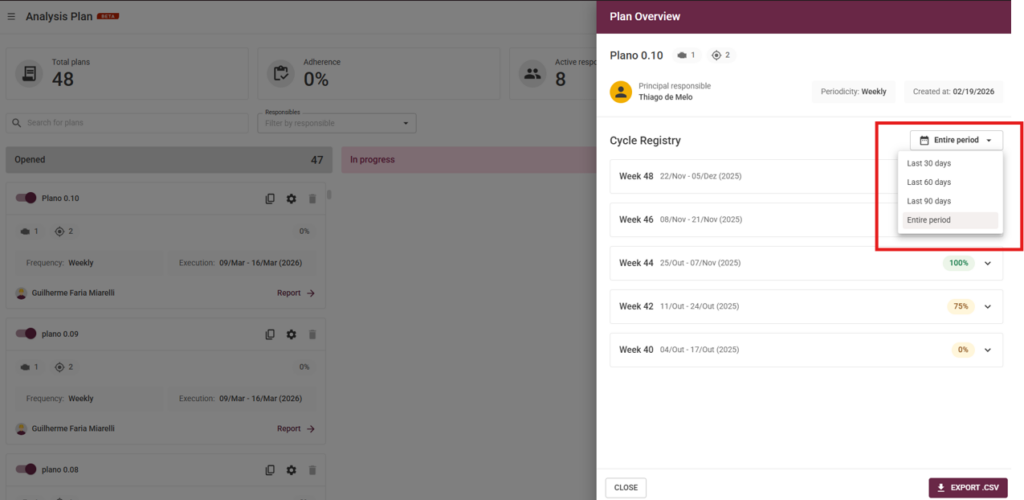
For each week, adherence rate (completion percentage) is automatically calculated based on the reports issued — including cases where one report covers multiple spots.
4. By expanding each week, you can see the status of each machine: which were inspected and which are pending, with visual check markers.
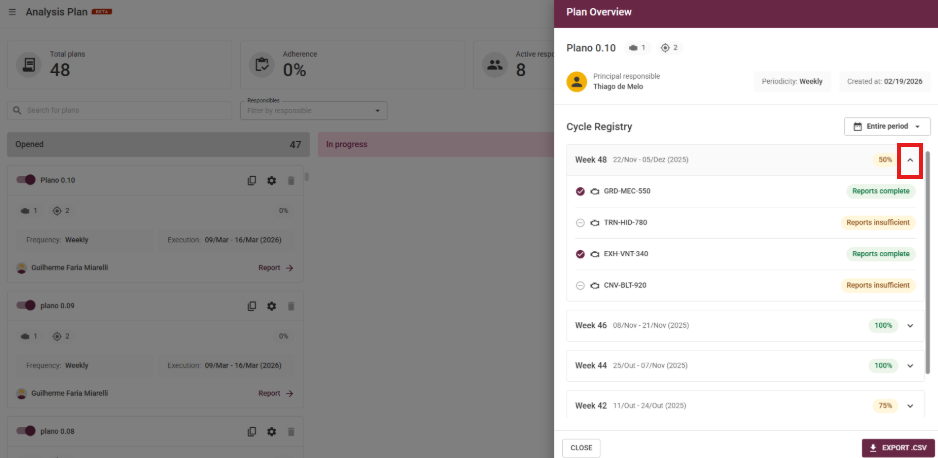
Progress can reach 100% once all required reports are entered, enabling the “Mark as analyzed” button. Closing the cycle, however, is always a manual action performed by the user, ensuring full control over final validation.
Key benefits for you:
- More transparency and traceability when tracking analysis plans
- Easier identification of bottlenecks, pending tasks, and improvement opportunities
- Detailed historical records for audits, compliance, and technical quality assurance
- Clear visualization of progress by machine and by cycle, supporting better management and decision-making
These improvements were designed to make your monitoring workflow more intuitive and efficient, contributing to a faster and clearer operation in your day-to-day activities.
If you have questions or want more details about any of these updates, talk to our team!
Until next time!
Dynamox Team
Back to articles


