


What's New?
Web: February | 2/2026
Updated at 3/11/2026
Hello,
Stay up to date with the latest features and enhancements we’ve just launched on the Dynamox Platform.
Check out what’s new and leverage these updates to their fullest!
____________________________________
Rescheduling spectral acquisition on an idle machine
Ensure that only relevant data is collected, analyzed, and stored by aligning spectral capture with the asset’s operating status.
This feature allows the system to automatically reschedule spectral collections when it detects — based on the operating thresholds configured on the Spot — that the machine is stopped.
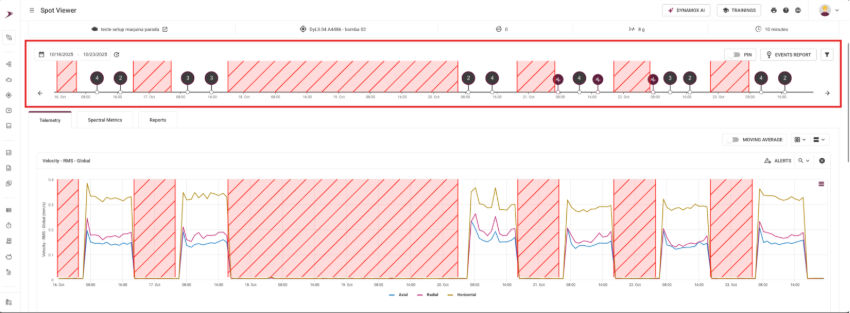
With rescheduling:
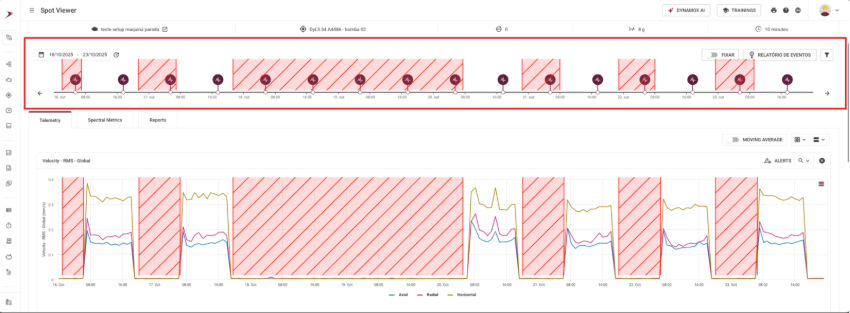
Without rescheduling:
In SpotViewer, you can clearly observe the effects of rescheduling by comparing the event timeline with the telemetry graphs:
With rescheduling enabled:
During periods when the global RMS velocity approaches 0 mm/s (indicating the machine is stopped), no spectral collection records are generated. These collections are rescheduled and performed only when the asset resumes operation.
Without rescheduling enabled:
The collection follows the gateway’s fixed schedule, generating spectral events even during downtime; cluttering the timeline with irrelevant events.
In SpectralViewer, the impact is seen in the quality and relevance of the available spectral graphs: With rescheduling enabled:
The spectral graphs reflect moments when the asset was actually operating, making the analysis more accurate and useful for diagnostics and decision‑making.
Without rescheduling enabled: A large volume of graphs is generated during inactive periods, which are not useful for analysis since they do not represent the asset’s real behavior.
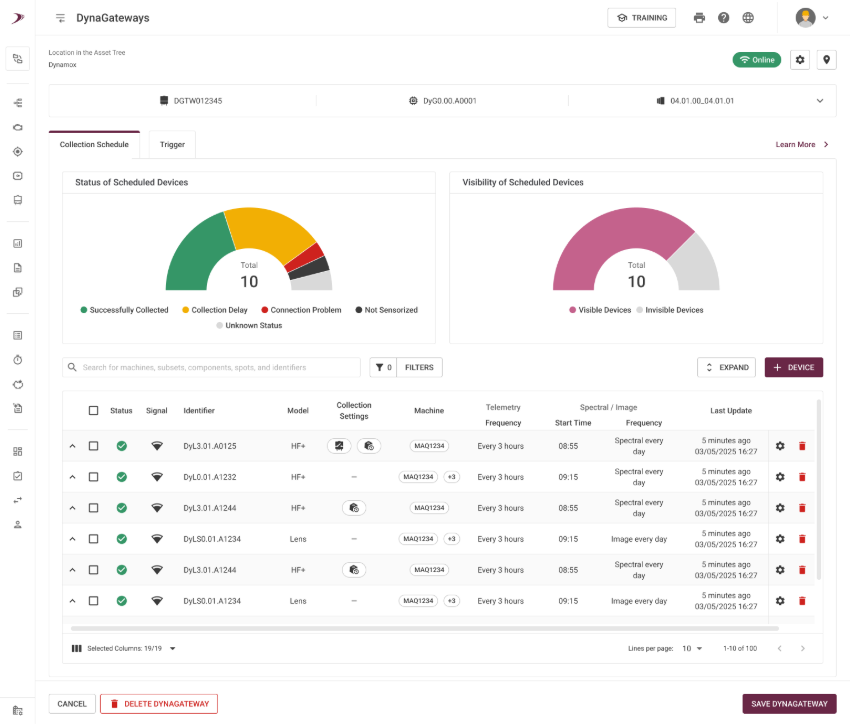
CONFIGURATION Rescheduling is configured through the collection schedule of the DynaGateway LTE or IoT, running firmware version 2.1.1. This option is not available in earlier versions.
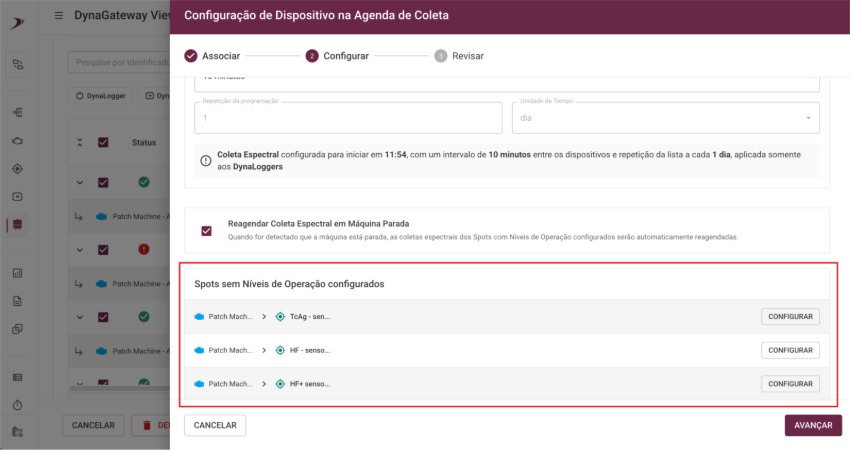
ATTENTION: When the configuration is set to triaxial, for operational‑level thresholds, any axis that exceeds the defined limit will be considered as the machine operating. In other words, the logical operator used is “OR”. If X, Y, or Z are above the threshold, the function will not be enabled, and a collection will be performed. In the DynaGateway Viewer screen, when you click the COLLECTION SCHEDULE button, the option appears disabled by defaultand must be selected to enable it.


If the Spot does not have operational levels configured, attempting to enable rescheduling will trigger a message informing you that this configuration is required, along with a button that takes you directly to the operational levels screen.
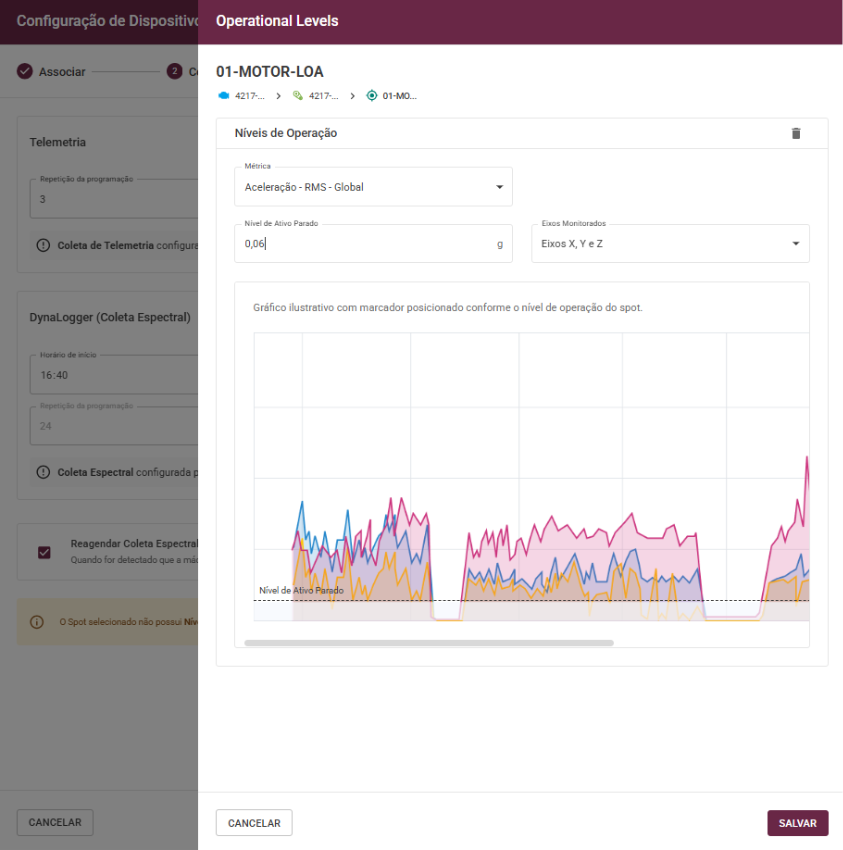
After configuring and saving the levels, the schedule can be adjusted normally. Then, you must:
- Save the schedule.
- Save the DynaGateway.
- Confirm the update.
After that, the icon for spectral‑collection rescheduling on idle machines will appear in the collection settings column.
The collections will be rescheduled according to the following sequence:
- Schedule 1 = 15 minutes, new attempt.
- Schedule 2 = 30 minutes, new attempt.
- Schedule 3 = 45 minutes, new attempt.
- Schedule 4 = 1 hour 15 minutes, new attempt.
In other words: A(N–1) + A(N–2) = AN.
The collections that do not take place will be displayed in the panel on the right side of the screen, after clicking the “EVENTS” button.

These improvements were designed to make your monitoring experience more intuitive and efficient, contributing to a smoother and clearer operation in your daily routine.
Do you have any questions or want to know more about any of these new features? Get in touch with our team!
See you next time!
The Dynamox Team
Back to articles


