


What's New?
Web: February | 1/2026
Updated at 3/11/2026
Hello,
Stay up to date with the latest features and enhancements we’ve just launched on the Dynamox Platform.
Check out what’s new and leverage these updates to their fullest!
_____________
ANALYSIS PLAN
Organization, standardization, and control for analysis routines.
The new Analysis Plan feature enables the creation of well‑structured plans designed to meet predictive maintenance requirements and maintenance strategy guidelines.
This brings operational discipline, clarity, and agility, resulting in safer decisions and more consistent outcomes.
- Standardized, traceable routines focused on the assets and critical points that truly matter.
- Higher technical quality, with complete and mandatory reports that prevent unsupported conclusions.
- Greater operational efficiency with clear prioritization of analyses and centralized process management.
- Strategic oversight, allowing leadership to monitor compliance and quickly correct deviations.
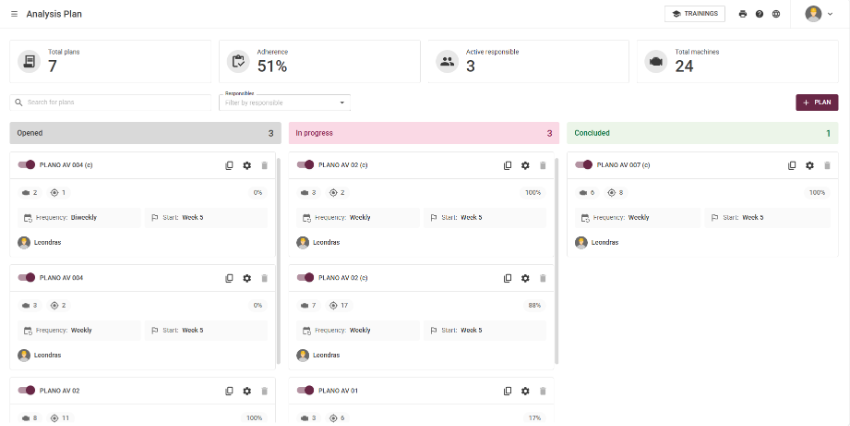
Efficiency in analyses
With greater traceability, prioritization, and predictive process management, analysts can structure condition analysis routines based on:
- the asset tree;
- relevant subsets;
- and the points that genuinely require periodic monitoring.
Meanwhile, Operations Leadership monitors plan compliance, evaluates deviations, and ensures consistent execution of the maintenance strategy.
Importance of reports
Here, the report is always mandatory for each machine/subassembly/spot.
Only after completing or updating all monitoring points within the report will the machine’s CHECK be available. Reinforcing analysis quality and preventing conclusions without proper technical justification.
Hands-on!
Creating an Analysis Plan
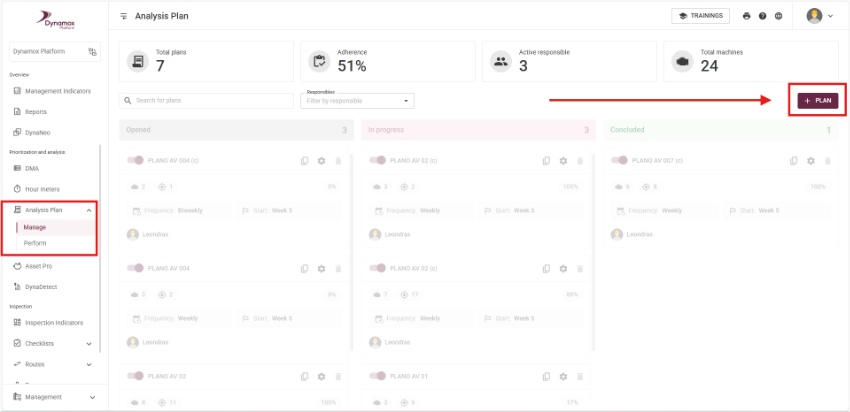
In the Prioritization and Analysis section of the side menu, you’ll find the new Analysis Plan option.
In Manage, click + PLAN, as shown below:
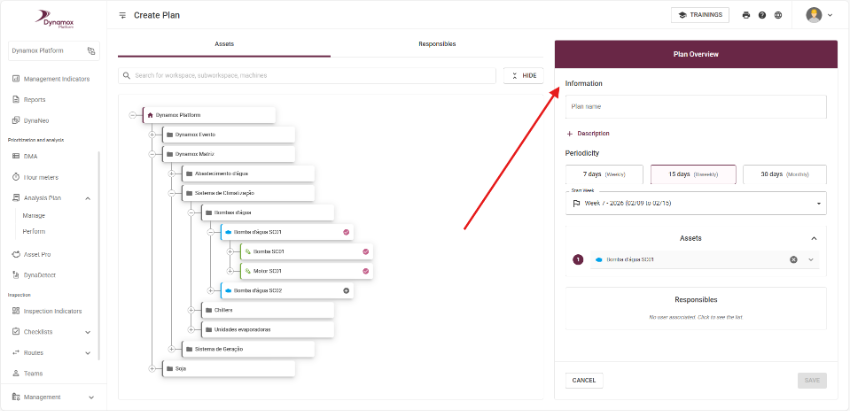
Then proceed with the configuration:
- Select the machine to be monitored.
- Choose the relevant sub-items and points for analysis.
- Set the periodicity.
- Assign responsibles.
- Save the plan.
- The analysis plan is now ready for execution.
The plan will automatically be generated according to the configured periodicity.
Executing the plan
When executing an analysis plan, the analyst:
- Accesses the machine’s monitoring point for analysis within the same navigation page.
- Records the analysis and observations.
- Completes the mandatory report.
Once the report is compliant for all points of the machine, the machine’s CHECK becomes available.

Managing analysis plans
To optimize management, the plan overview provides indicators and a kanban-style display showing the total number of plans, average compliance, responsible analyst, total assets, list of configured plans, and the execution status of each plan.


This product was designed to make your monitoring experience more intuitive and efficient, helping you streamline daily operations with greater clarity and agility.
Be an active part of these improvements — the Analysis Plan is currently in the beta stage and open to receive your feedback and suggestions.
Your insights can shape the next updates.
Do you have questions or want to learn more about this new feature?
Get in touch with our team!
See you next time!
Dynamox Team
Back to articles


